There should be at least two course projects by this stage for which the learner has assembled assets now. Including a script, story boards, footage, graphics and images. This module is a practical guided experiential process of assembling those assets, working together, and learning how to use the software.

The first homework project is adding and editing together visuals for your first project, the portfolio or simple promo ad, developed during Scripting Module 1.
The second more major project and portfolio piece is the medium length scripted mini-documentary or EPK Video News Press Release – developed in Scripting, Module 1.
Some of the theory for editing film was introduced in the Shooting & Production module using Eisenstein’s theories of ‘montage’, which is the French word for editing, from his book ‘Film Sense’. This is a good starter read, as a lot of film theory comes from Eisenstein’s ideas on film.
Apart from producing and occasional voice work, the area I am most experienced in is editing commercials, corporate films, documentaries and a few feature films. This is where everything comes together, also commonly referred to as the final rewrite of the script.
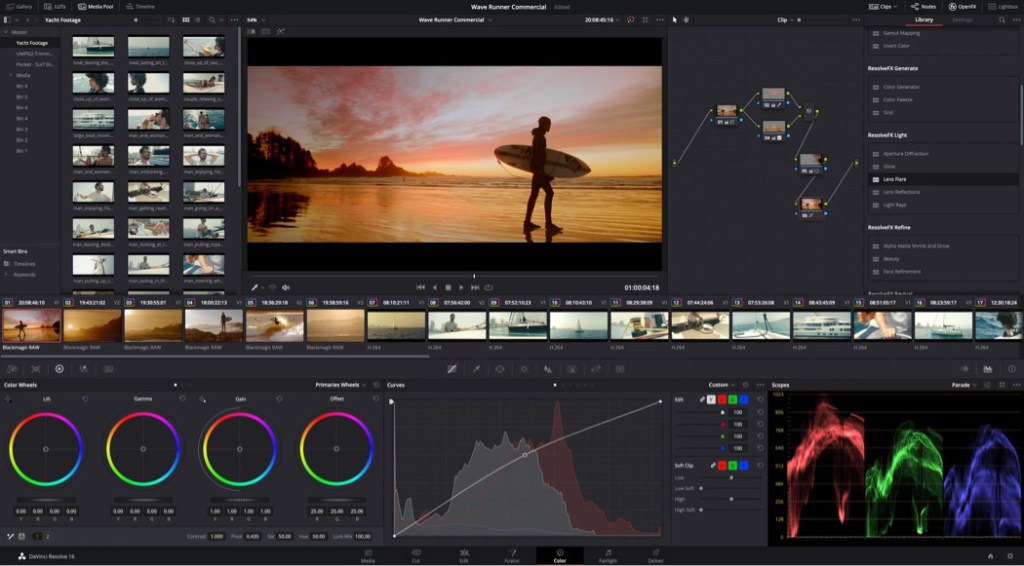
Throughout the course attempts to restrict software used to professional platforms which have free versions available, as much possible. I personally have mostly used Avid Film Composers for offline cutting and Avid Symphony for finishing (the final online edit) and colourisation. However for the longest time, DaVinci has been the state of the art in Hollywood for grading and colour correction. This platform is also extremely flexible and includes the ability to edit film as well as manipulate 3D objects, so I’d recommend that. However, you can also use Premiere Pro.
 Charley Weber Portfolio